Reverse in ASP.NET CORE Timeline
21 Aug 20261 minute to read
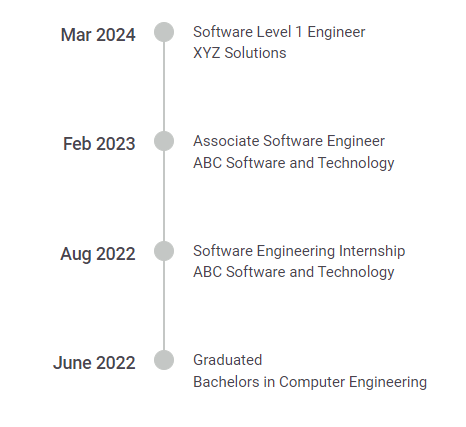
You can display the Timeline items in reverse order, for different alignments by using the reverse property which provides adaptability and improves user interaction.
@using Syncfusion.EJ2.Layouts;

<div class="container" style="height: 350px">
    <ejs-timeline id="timeline" align="Before" reverse=true>
        <e-timeline-items>
            @for (int i = 0; i < ViewBag.careerProgress.Count; i++)
            {
                <e-timeline-item content="@ViewBag.careerProgress[i].Content" oppositeContent="@ViewBag.careerProgress[i].OppositeContent"></e-timeline-item>
            }
        </e-timeline-items>
    </ejs-timeline>
</div>
public ActionResult Demo()
{
List<TimelineItem> careerProgress = new List<TimelineItem>();
careerProgress.Add(new TimelineItem { Content = "June 2022", OppositeContent = "Graduated \n Bachelors in Computer Engineering" });
careerProgress.Add(new TimelineItem { Content = "Aug 2022", OppositeContent = "Software Engineering Internship \n ABC Software and Technology" });
careerProgress.Add(new TimelineItem { Content = "Feb 2023", OppositeContent = "Associate Software Engineer \n ABC Software and Technology" });
careerProgress.Add(new TimelineItem { Content = "Mar 2024", OppositeContent = "Software Level 1 Engineer \n XYZ Solutions" });
ViewBag.careerProgress = careerProgress;
return View();
}