How can I help you?
Alignment in ASP.NET CORE Timeline control
20 Mar 20247 minutes to read
You can display the Timeline content Before, After, Alternate and AlternateReverse by using the align property. The oppositeContent will be displayed parallel to the content when configured.
Before
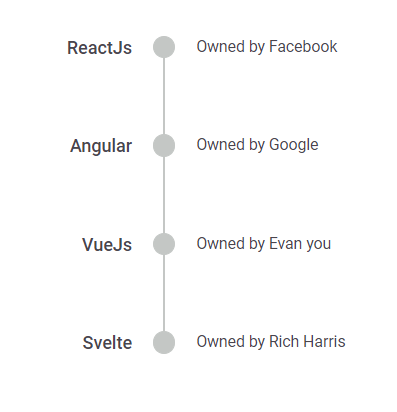
In Before alignment, for horizontal orientation the item content is placed at the top and oppositeContent at the bottom whereas in vertical, the content to the left and oppositeContent to the right.
@using Syncfusion.EJ2.Layouts;

<div class="container" style="height:350px">
    <ejs-timeline id="timeline" align="Before">
        <e-timeline-items>
            <e-timeline-item content="ReactJs" oppositeContent="Owned by Facebook"></e-timeline-item>
            <e-timeline-item content="Angular" oppositeContent="Owned by Google"></e-timeline-item>
            <e-timeline-item content="VueJs" oppositeContent="Owned by Evan you"></e-timeline-item>
            <e-timeline-item content="Svelte" oppositeContent="Owned by Rich Harris"></e-timeline-item>
        </e-timeline-items>
    </ejs-timeline>
</div>
public ActionResult Demo()
{
List<TimelineItem> frameworks = new List<TimelineItem>();
frameworks.Add(new TimelineItem { Content = "ReactJs", OppositeContent = "Owned by Facebook" });
frameworks.Add(new TimelineItem { Content = "Angular", OppositeContent = "Owned by Google" });
frameworks.Add(new TimelineItem { Content = "VueJs", OppositeContent = "Owned by Evan you" });
frameworks.Add(new TimelineItem { Content = "Svelte", OppositeContent = "Owned by Rich Harris" });
ViewBag.frameworks = frameworks;
return View();
}
After
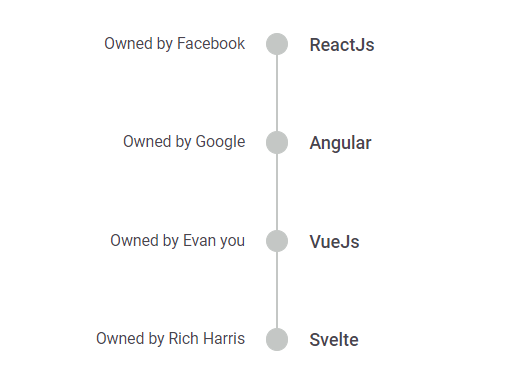
In After alignment, for horizontal orientation the item content is placed at the bottom and oppositeContent at the top whereas in vertical, the content to the right and oppositeContent to the left.
@using Syncfusion.EJ2.Layouts;

<div class="container" style="height:350px">
    <ejs-timeline id="timeline" align="After">
        <e-timeline-items>
            <e-timeline-item content="ReactJs" oppositeContent="Owned by Facebook"></e-timeline-item>
            <e-timeline-item content="Angular" oppositeContent="Owned by Google"></e-timeline-item>
            <e-timeline-item content="VueJs" oppositeContent="Owned by Evan you"></e-timeline-item>
            <e-timeline-item content="Svelte" oppositeContent="Owned by Rich Harris"></e-timeline-item>
        </e-timeline-items>
    </ejs-timeline>
</div>
public ActionResult Demo()
{
List<TimelineItem> frameworks = new List<TimelineItem>();
frameworks.Add(new TimelineItem { Content = "ReactJs", OppositeContent = "Owned by Facebook" });
frameworks.Add(new TimelineItem { Content = "Angular", OppositeContent = "Owned by Google" });
frameworks.Add(new TimelineItem { Content = "VueJs", OppositeContent = "Owned by Evan you" });
frameworks.Add(new TimelineItem { Content = "Svelte", OppositeContent = "Owned by Rich Harris" });
ViewBag.frameworks = frameworks;
return View();
}
Alternate
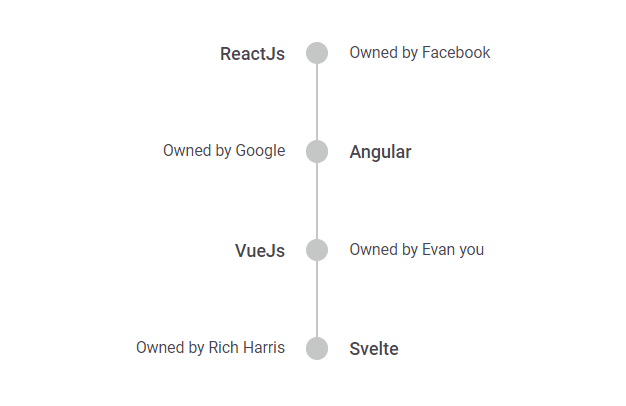
In Alternate alignment, the item content are arranged alternatively regardless of the Timeline orientation.
@using Syncfusion.EJ2.Layouts;

<div class="container" style="height:350px">
    <ejs-timeline id="timeline" align="Alternate">
        <e-timeline-items>
            <e-timeline-item content="ReactJs" oppositeContent="Owned by Facebook"></e-timeline-item>
            <e-timeline-item content="Angular" oppositeContent="Owned by Google"></e-timeline-item>
            <e-timeline-item content="VueJs" oppositeContent="Owned by Evan you"></e-timeline-item>
            <e-timeline-item content="Svelte" oppositeContent="Owned by Rich Harris"></e-timeline-item>
        </e-timeline-items>
    </ejs-timeline>
</div>
public ActionResult Demo()
{
List<TimelineItem> frameworks = new List<TimelineItem>();
frameworks.Add(new TimelineItem { Content = "ReactJs", OppositeContent = "Owned by Facebook" });
frameworks.Add(new TimelineItem { Content = "Angular", OppositeContent = "Owned by Google" });
frameworks.Add(new TimelineItem { Content = "VueJs", OppositeContent = "Owned by Evan you" });
frameworks.Add(new TimelineItem { Content = "Svelte", OppositeContent = "Owned by Rich Harris" });
ViewBag.frameworks = frameworks;
return View();
}
Alternate reverse
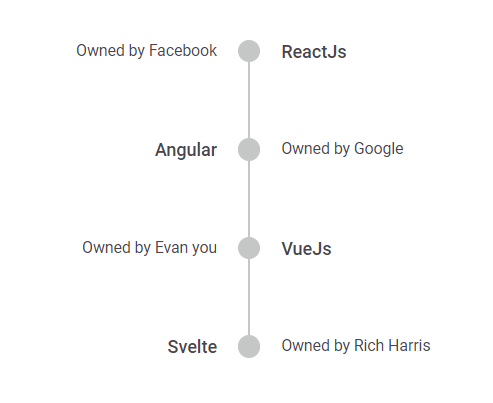
In AlternateReverse alignment, the item content are arranged in reverse alternate regardless of the Timeline orientation.
@using Syncfusion.EJ2.Layouts;

<div class="container" style="height:350px">
    <ejs-timeline id="timeline" align="AlternateReverse">
        <e-timeline-items>
            <e-timeline-item content="ReactJs" oppositeContent="Owned by Facebook"></e-timeline-item>
            <e-timeline-item content="Angular" oppositeContent="Owned by Google"></e-timeline-item>
            <e-timeline-item content="VueJs" oppositeContent="Owned by Evan you"></e-timeline-item>
            <e-timeline-item content="Svelte" oppositeContent="Owned by Rich Harris"></e-timeline-item>
        </e-timeline-items>
    </ejs-timeline>
</div>
public ActionResult Demo()
{
List<TimelineItem> frameworks = new List<TimelineItem>();
frameworks.Add(new TimelineItem { Content = "ReactJs", OppositeContent = "Owned by Facebook" });
frameworks.Add(new TimelineItem { Content = "Angular", OppositeContent = "Owned by Google" });
frameworks.Add(new TimelineItem { Content = "VueJs", OppositeContent = "Owned by Evan you" });
frameworks.Add(new TimelineItem { Content = "Svelte", OppositeContent = "Owned by Rich Harris" });
ViewBag.frameworks = frameworks;
return View();
}