Adornments in ASP.NET CORE NumericTextBox
21 Aug 20269 minutes to read
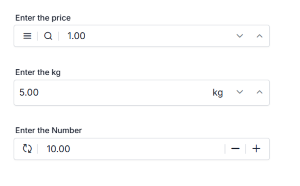
Adornments allow you to add custom elements before or after the numeric textbox using the prependTemplate and appendTemplate properties. These elements can include currency symbols, unit labels, or action icons to provide context and quick actions without affecting numeric behavior or float label functionality.
Common Use Cases
- Currency Symbols: Add indicators like $, €, ¥ for monetary inputs.
- Unit Labels: Show measurement units (kg, cm, km).
- Action Icons: Include buttons for clear, reset, or custom actions.
- Visual Context: Display icons for input type or status.
Adding Adornments to NumericTextBox
Use prependTemplate and appendTemplate to inject HTML content before and after the masked input respectively. These templates do not alter mask behavior and support any inline HTML or icon.
prependTemplate: Renders elements before the numeric textbox.
appendTemplate: Renders elements after the numeric textbox.
The following example demonstrates how to add adornments in the NumericTextBox control.
@page
@using EJ2CoreSampleBrowser.Models
@using Syncfusion.EJ2

@section ControlsSection{
    <div class="col-lg-12 control-section">
        <div class="content-wrapper">
            <div class="row custom-margin e-prependtemplate">
                <ejs-numerictextbox id="prepend" value="1" placeholder="Enter the price" floatLabelType="Auto" created="onPrependCreated" change="onPriceChange"
                    prependTemplate="@Html.Raw("<span id='menu' class='e-icons e-menu' title='Menu'></span><span class='e-input-separator'></span><span id='search' class='e-icons e-search' title='Search'></span><span class='e-input-separator'></span>")">
                </ejs-numerictextbox>
            </div>
            <div class="row custom-margin e-appendtemplate">
                <ejs-numerictextbox id="append" step="1" value="5" placeholder="Enter the kg" floatLabelType="Auto" change="onKgChange"
                    appendTemplate="@Html.Raw("<span>kg</span>")">
                </ejs-numerictextbox>
            </div>
            <div class="row custom-margin custom-margin-row e-icontemplate">
                <ejs-numerictextbox id="icontemplate" value="10" placeholder="Enter the Number" floatLabelType="Auto" created="onIconTemplateCreated" ShowSpinButton="false"
                    prependTemplate="@Html.Raw("<span id='reset' class='e-icons e-reset' title='Reset'></span><span class='e-input-separator'></span>")"
                    appendTemplate="@Html.Raw("<span class='e-input-separator'></span><span id='subract' class='e-icons e-horizontal-line'></span><span class='e-input-separator'></span><span id='plus' class='e-icons e-plus'></span>")">
                </ejs-numerictextbox>
            </div>
        </div>
    </div>
}

@*custom code start*@
<style>
    .content-wrapper {
        width: 35%;
        margin: 0 auto;
        min-width: 250px;
    }
    .custom-margin {
        margin: 25px 0;
    }
    .e-icons.e-search {
        background-color: rgba(0, 0, 0, 0) !important;
    }
    .e-numeric.e-control-wrapper.e-input-group .e-input-group-icon {
        background-color: rgba(0,0,0,0) !important;
    }
    .bootstrap5\.3 .e-icontemplate .e-prepend-template,
    .bootstrap5\.3 .e-prependtemplate .e-prepend-template,
    .bootstrap5\.3-dark .e-icontemplate .e-prepend-template,
    .bootstrap5\.3-dark .e-prependtemplate .e-prepend-template,
    .tailwind3 .e-icontemplate .e-prepend-template,
    .tailwind3 .e-prependtemplate .e-prepend-template,
    .tailwind3-dark .e-icontemplate .e-prepend-template,
    .tailwind3-dark .e-prependtemplate .e-prepend-template {
        padding-right: 0 !important;
    }
    .fluent2 .e-icontemplate .e-prepend-template,
    .fluent2-dark .e-icontemplate .e-prepend-template,
    .fluent2-highcontrast .e-icontemplate .e-prepend-template,
    .fluent2 .e-prependtemplate .e-prepend-template,
    .fluent2-dark .e-prependtemplate .e-prepend-template,
    .fluent2-highcontrast .e-prependtemplate .e-prepend-template {
        padding-left: 8px !important;
    }
    .fluent2 .e-appendtemplate .e-numerictextbox,
    .fluent2-dark .e-appendtemplate .e-numerictextbox,
    .fluent2-highcontrast .e-appendtemplate .e-numerictextbox {
        padding-left: 8px !important;
    }
    .material3 .e-icontemplate .e-prepend-template,
    .material3-dark .e-icontemplate .e-prepend-template,
    .material3 .e-prependtemplate .e-prepend-template,
    .material3-dark .e-prependtemplate .e-prepend-template {
        padding-left: 0 !important;
    }
    .e-bigger.bootstrap5\.3 .row.custom-margin .e-append-template,
    .e-bigger.bootstrap5\.3-dark .row.custom-margin .e-append-template {
        padding: 7px !important;
    }
    .e-bigger.fluent2 .row.custom-margin .e-append-template,
    .e-bigger.fluent2-dark .row.custom-margin .e-append-template,
    .e-bigger.fluent2-highcontrast .row.custom-margin .e-append-template,
    .e-bigger.tailwind3 .row.custom-margin .e-append-template,
    .e-bigger.tailwind3-dark .row.custom-margin .e-append-template {
        padding: 8px !important;
    }
    .e-icontemplate .e-icons.e-reset,
    .e-icontemplate .e-icons.e-horizontal-line,
    .e-icontemplate .e-icons.e-plus {
        cursor: pointer;
    }
</style>
@*custom code end*@

@section PreScripts {
    <script>
        function onPrependCreated() {
            var prefixLabel = new ej.dropdowns.DropDownList({width: '60px'});
            prefixLabel.appendTo('#select');
        }
        function onPriceChange() {
            var prependNumeric = document.getElementById("prepend").ej2_instances[0];
            var appendNumeric = document.getElementById("append").ej2_instances[0];
            appendNumeric.value = prependNumeric.value * 5;
            appendNumeric.dataBind();
        }
        function onKgChange() {
            var prependNumeric = document.getElementById("prepend").ej2_instances[0];
            var appendNumeric = document.getElementById("append").ej2_instances[0];
            prependNumeric.value = appendNumeric.value / 5;
            prependNumeric.dataBind();
        }
        function onIconTemplateCreated() {
            var resetSpan = document.querySelector('#reset');
            if (resetSpan) {
                resetSpan.addEventListener('click', function() {
                    var iconNumeric = document.getElementById("icontemplate").ej2_instances[0];
                    iconNumeric.value = 0;
                    iconNumeric.dataBind();
                });
            }
            var subractSpan = document.querySelector('#subract');
            if (subractSpan) {
                subractSpan.addEventListener('click', function() {
                    var iconNumeric = document.getElementById("icontemplate").ej2_instances[0];
                    iconNumeric.value = iconNumeric.value - 1;
                    iconNumeric.dataBind();
                });
            }
            var plusSpan = document.querySelector('#plus');
            if (plusSpan) {
                plusSpan.addEventListener('click', function() {
                    var iconNumeric = document.getElementById("icontemplate").ej2_instances[0];
                    iconNumeric.value = iconNumeric.value + 1;
                    iconNumeric.dataBind();
                });
            }
        }
    </script>
}
Output be like the below.