Grouping MultiSelect items
28 Aug 20263 minutes to read
The MultiSelect supports grouping list items by category. The category of each list item can be mapped through the groupBy field in the data table. The group header is displayed as both inline and fixed headers. The fixed group header content is updated dynamically as the popup list scrolls, showing the current category.
In the following sample, vegetables are grouped by their category using the groupBy field.
<div id='groupList' class='col-lg-6' style='padding-top:15px'>
    <div class='content'>
        <ejs-multiselect id="vegetables" placeholder="Select a vegetable" popupHeight="200px" dataSource="@ViewBag.data">
            <e-multiselect-fields groupBy="Category" value="Vegetable"></e-multiselect-fields>
        </ejs-multiselect>
    </div>
</div>
using System;
using System.Collections.Generic;
using System.Linq;
using System.Threading.Tasks;
using Microsoft.AspNetCore.Mvc;
using WebApplication1.Models;
namespace WebApplication1.Controllers
{
public class MultiSelectController : Controller
{
public ActionResult grouping()
{
ViewBag.data = new Vegetables().VegetablesList();
return View();
}
}
}Customization
The grouping header supports customization. You can design custom inline or fixed headers by using the groupTemplate property, as described in Group Template support for MultiSelect.
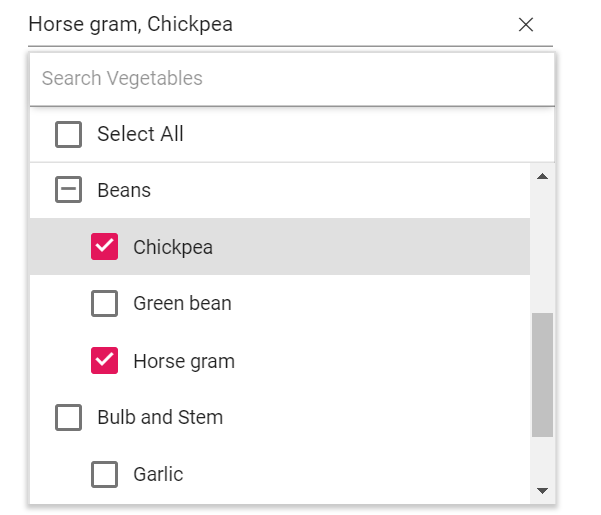
Grouping with checkbox
Earlier releases did not provide a checkbox in group headers. With this feature, you can render a checkbox in the group header to select all items in the group in a single selection. Enable this feature by setting the enableGroupCheckBox property to true and the mode property to CheckBox.
Inject the CheckBoxSelection module into the MultiSelect to use the checkbox.
<div id='groupList' class='col-lg-6' style='padding-top:15px'>
    <div class='content'>
        <ejs-multiselect id="vegetables" placeholder="Select vegetables" popupHeight="200px" mode="CheckBox" enableGroupCheckBox="true" showSelectAll="true" allowFiltering="true" filterBarPlaceholder="Search Vegetables" dataSource="@ViewBag.data">
            <e-multiselect-fields groupBy="Category" value="Vegetable"></e-multiselect-fields>
        </ejs-multiselect>
    </div>
</div>
using System;
using System.Collections.Generic;
using System.Linq;
using System.Threading.Tasks;
using Microsoft.AspNetCore.Mvc;
using WebApplication1.Models;
namespace WebApplication1.Controllers
{
public class MultiSelectController : Controller
{
public ActionResult grouping()
{
ViewBag.data = new Vegetables().VegetablesList();
return View();
}
}
}Output be like the below: