Types in ASP.NET CORE Chips
17 Aug 20263 minutes to read
The ChipList control has the following types.
- Input Chips
- Choice Chips
- Filter Chips
- Action Chips
Input Chips
Input Chips holds information in compact form. It converts user input into Chips.
<ejs-chiplist id="chip-avatar">
    <e-chips>
      <e-chip text="Andrew" enabled="true"></e-chip>
      <e-chip text="Janet" enabled="true"></e-chip>
      <e-chip text="Laura" enabled="true"></e-chip>
      <e-chip text="Margaret" enabled="true"></e-chip>
    </e-chips>
</ejs-chiplist>
Choice Chips
Choice Chips allows to select a single Chips from the set of ChipList/ChipCollection. It can be enabled by setting the selection property to Single.
<ejs-chiplist id="chip-avatar" selection="Single">
    <e-chips>
      <e-chip text="Small" enabled="true"></e-chip>
      <e-chip text="Medium" enabled="true"></e-chip>
      <e-chip text="Large" enabled="true"></e-chip>
      <e-chip text="Extra Large" enabled="true"></e-chip>
    </e-chips>
</ejs-chiplist>
Filter Chips
Filter Chips allows to select a multiple Chips from the set of ChipList/ChipCollection. It can be enabled by setting the selection property to Multiple.
<ejs-chiplist id="chip-avatar" selection="Multiple">
    <e-chips>
      <e-chip text="Chai" enabled="true"></e-chip>
      <e-chip text="Chang" enabled="true"></e-chip>
      <e-chip text="Aniseed Syrup" enabled="true"></e-chip>
      <e-chip text="Ikura" enabled="true"></e-chip>
    </e-chips>
</ejs-chiplist>
Action Chips
The Action Chips triggers the event like click or delete, which helps doing action based on the event.
<ejs-chiplist id="chip-avatar" click="chipclick">
    <e-chips>
      <e-chip text="Sent a text" enabled="true"></e-chip>
      <e-chip text="Set a remainder" enabled="true"></e-chip>
      <e-chip text="Read my emails" enabled="true"></e-chip>
      <e-chip text="Set alarm" enabled="true"></e-chip>
    </e-chips>
</ejs-chiplist>

<script>
  function chipclick(e){
      alert('you have clicked ' + e.text);
  }
</script>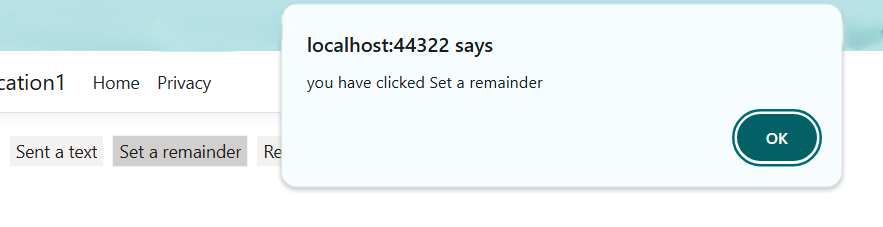
Deletable Chips
Deletable Chips allows to delete a Chips from ChipList/ChipCollection. It can be enabled by setting the enableDelete property to true.
<ejs-chiplist id="chip-avatar" enableDelete="true">
    <e-chips>
      <e-chip text="Sent a text" enabled="true"></e-chip>
      <e-chip text="Set a remainder" enabled="true"></e-chip>
      <e-chip text="Read my emails" enabled="true"></e-chip>
      <e-chip text="Set alarm" enabled="true"></e-chip>
    </e-chips>
</ejs-chiplist>