Ranges in ASP.NET Core Bullet Chart
7 Aug 20263 minutes to read
Ranges represent the quality of a specific range such as Good, Bad and Satisfactory in the Bullet Chart scale. The ending point of a qualitative range is specified in the End property in Ranges. The Minimum value of a quantitative scale is considered the starting point of the first range or the previous range end point.
@{
    List<Range> bulletData = new List<Range>
    {
        new Range { value = 55, target = 75, category = "Year 1"},
        new Range { value = 70, target = 70, category = "Year 2"},
        new Range { value = 85, target = 75, category = "Year 3"}
    };
}

<ejs-bulletchart id="bulletgraph" minimum="0" maximum="100" interval="20" categoryField="category" valueField="value" targetField="target" dataSource="bulletData">
    <e-bullet-range-collection>
        <e-bullet-range end="35"></e-bullet-range>
        <e-bullet-range end="50"></e-bullet-range>
        <e-bullet-range end="100"></e-bullet-range>
    </e-bullet-range-collection>
</ejs-bulletchart>
...
public class Range
{
public double value;
public double target;
public string category;
}
Color customization
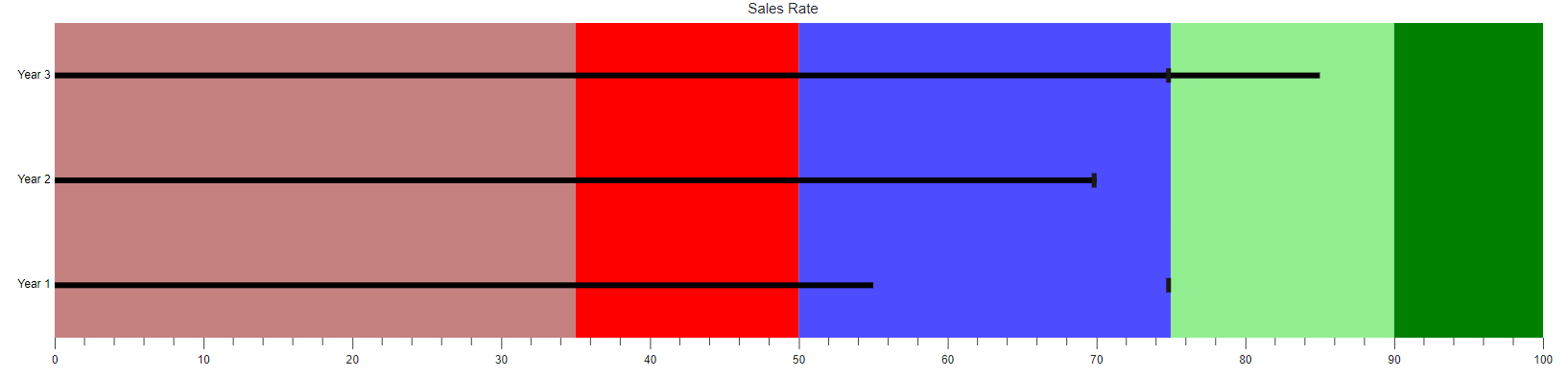
Enhance the readability of ranges with color and opacity. It can be applied using the Color and Opacity properties in Ranges.
@{
    List<Custom> bulletData = new List<Custom>
    {
        new Custom { value = 55, target = 75, category = "Year 1"},
        new Custom { value = 70, target = 70, category = "Year 2"},
        new Custom { value = 85, target = 75, category = "Year 3"}
    };
}

<ejs-bulletchart id="bulletgraph" height="400" title="Sales Rate" categoryField="category" minimum="0" maximum="100" interval="10" valueField="value" targetField="target" dataSource="bulletData">
    <e-bullet-range-collection>
        <e-bullet-range end="35" color="darkred" opacity="0.5"></e-bullet-range>
        <e-bullet-range end="50" color="red" opacity="1"></e-bullet-range>
        <e-bullet-range end="75" color="blue" opacity="0.7"></e-bullet-range>
        <e-bullet-range end="90" color="lightgreen" opacity="1"></e-bullet-range>
        <e-bullet-range end="100" color="green" opacity="1"></e-bullet-range>
    </e-bullet-range-collection>
</ejs-bulletchart>
...
public class Custom
{
public double value;
public double target;
public string category;
}