Data Binding in ASP.NET Core Bullet Chart
7 Aug 20261 minute to read
Bullet Chart can visualize data bound from local or remote data.
Local data
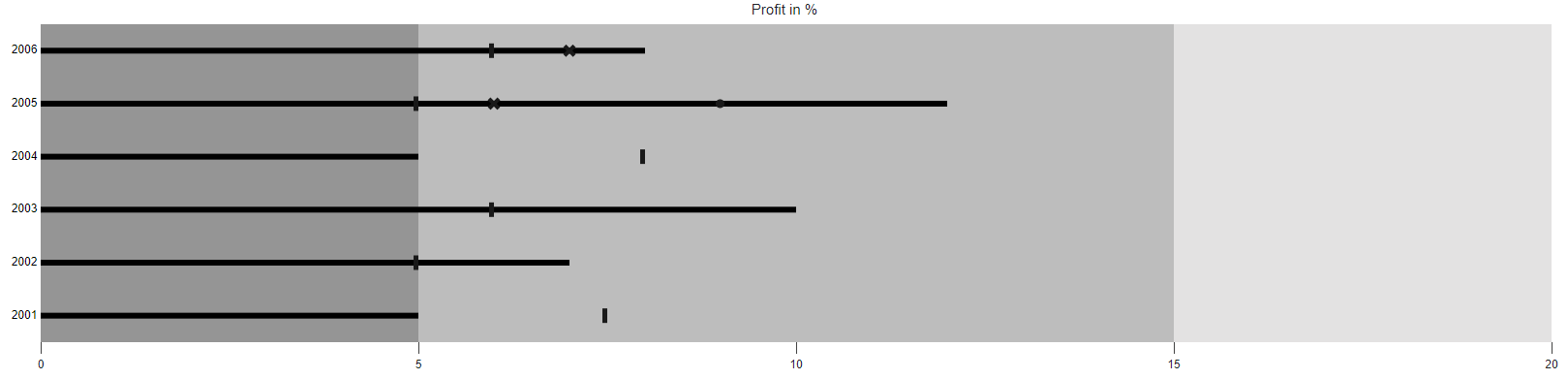
You can bind a simple JSON data to the chart using DataSource direct property of the bullet-chart. Now, map the fields in JSON to ValueField and TargetField properties. The DataSource property accepts a collection of values as input that helps to display measures, and compares them to a target bar. To display the actual and target bar, specify the property from the datasource into the ValueField and TargetField respectively.
@{
    List<LocalBulletData> bulletData = new List<LocalBulletData>
    {
        new LocalBulletData { value = 5, comparativeMeasureValue = 7.5, category= "2001"},
        new LocalBulletData { value = 7, comparativeMeasureValue = 5, category= "2002"},
        new LocalBulletData { value = 10, comparativeMeasureValue = 6, category= "2003"},
        new LocalBulletData { value = 5, comparativeMeasureValue = 8, category= "2004"},
        new LocalBulletData { value = 12, comparativeMeasureValue = 5, category= "2005"},
        new LocalBulletData { value = 8, comparativeMeasureValue = 6, category= "2006"}
    };
}

<ejs-bulletchart id="bulletgraph" height="400" title="Profit in %" minimum="0" maximum="20" interval="5" categoryField="category" valueField="value" targetField="comparativeMeasureValue" dataSource="bulletData">
    <e-bullet-range-collection>
        <e-bullet-range end="5"></e-bullet-range>
        <e-bullet-range end="15"></e-bullet-range>
        <e-bullet-range end="20"></e-bullet-range>
    </e-bullet-range-collection>
</ejs-bulletchart>
...
public class LocalBulletData
{
public double value;
public double comparativeMeasureValue;
public string category;
}